
The following requirements have been established to guide authors in preparing their lecture and poster presentations.

 2026 IEEE International Conference on Image Processing
2026 IEEE International Conference on Image Processing
13-17 September 2026, Tampere, Finland
Presentation Instructions

Lecture Presentations
Presentation Time
Presentation time is critical; each paper is allocated a specific time frame, including time for questions, session chair introductions, and any set up that is not completed in advance. We recommend that the presentation time of your slides should leave a few minutes for introduction by the session chair and questions from the audience. To achieve appropriate timing, organize your slides or viewgraphs around the points you intend to make, using no more than one slide per minute. A reasonable strategy is to allocate about 2 minutes per slide when there are equations or important key points to make, and one minute per slide when the content is less complex. Slides attract and hold attention, and reinforce what you say – provided you keep them simple and easy to read. Plan on covering at most 6 points per slide, covered by 6 to 12 spoken sentences and no more than about two spoken minutes.
Be prepared to begin your presentation as soon as the prior presenter has finished; it is important to keep on schedule. Copying your files to the computer before the session will also save you some time during your presentation.
Organization of Ideas
Make sure each of your key points is easy to explain with aid of the material on your slides. Do not read directly from the slide during your presentation. You shouldn’t need to prepare a written speech, although it is often a good idea to prepare the opening and closing sentences in advance. It is very important that you rehearse your presentation in front of an audience before you give your presentation at ICIP 2026.
Qualified Proxy
The presentation of papers by substitutes may only be made after permission is granted by the Technical Program Chair(s) of the conference based on solid evidence that none of the authors is available to present. Qualified proxy presenters must be sufficiently familiar with the material being presented to answer detailed questions from the audience.
Equipment Provided
- screen, projector and laptop
- one fixed microphone
- flap-board if needed
- presentation clicker / laser pointer
Each laptop will have a recent version of the Windows OS installed, a USB port, as well as PowerPoint and Acrobat Reader software. Remember to embed all your fonts into your presentation, if you are using any special font or plug-in such as MathType.
Please, pay attention to the following critical points:
- There WILL NOT be a CD-ROM drive in the presentation room
- Make sure your presentation does not run into a problem on Windows platform, if you are a Mac or Linux user
- If you will be playing video or animated media, make sure it runs on Windows Media Player
- Embed all the fonts in your presentation
Keep in mind that some of the lecture presentations will be given in quite large lecture halls. When preparing your slides, make sure that the entire audience will be able to see your presentation.
Poster Presentations
Poster sessions are a good medium for authors to present papers and meet with interested attendees for in-depth technical discussions. In addition, attendees find the poster sessions a good way to sample many papers in parallel sessions. Thus it is important that you display your message clearly and noticeably to attract people who might have an interest in your paper.
Each poster session is 120 minutes long. You must remain present for the entire duration of your poster session. Please arrive at the poster area about 15 minutes before your session begins and report to the session chairs.
All posters should remain on the boards for the entire session time. Everyone should mount their poster on the boards before the session begins. See below a photo of wired-mesh stand with poster boards.
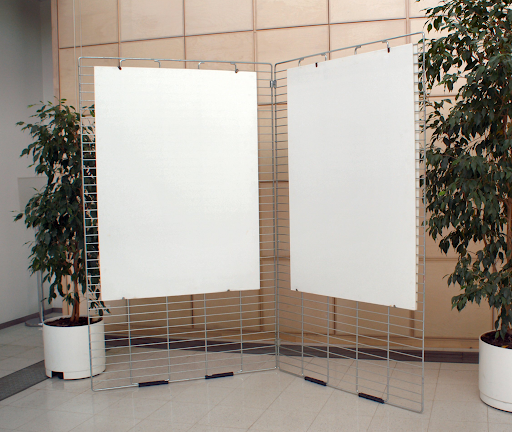
You should prepare a 5- to 10-minute presentation of your work, concentrating on the key innovation, and be ready to interact with the audience that approaches your poster. Please put up your poster before the session, and take it down immediately following the session. Push pins and adhesives will be available to mount the poster on the board. If you have difficulty locating any supplies, please contact the session chairs, the assisting conference volunteers, or the conference registration desk.
We encourage you to print your poster in A0 format. If your poster is constructed of multiple pieces of paper, it is highly recommended that you plan to be at your poster location sufficiently in advance to allow you to complete mounting of your poster on the board prior to the start of your presentation block. Alternatively, you may consider taping together all of the pieces before you mount the poster on the board to speed up the mounting process.
Dimensions
For each paper accepted within a poster session, prepare a poster of A0 size, portrait orientation: 841mm (width) x 1189mm (height). The dimensions of the poster board are 1000 mm (width) x 1250 mm (height) (see the photo above). ICIP 2026 organizers provide push pins to attach your posters to the boards. Attachment devices or tape other than the conference-provided ones may not be used, due to possible damage to the poster boards. Note that THERE WILL BE NO ACCESS TO ELECTRIC OUTLETS. Thus, a laptop or tablet should be fully charged if intended to be used as part of the presentation.
The poster stands will be arranged in four areas, each dedicated to one poster session. Each reserved poster space will be assigned an ID of the paper to be presented there. You will identify the place to post your poster by searching for your paper ID. It is important that the poster is attached to the correct space as identified in the technical program and in the communication sent to the presenter.
Organization of Ideas
Your poster should cover the key points of your work. It needs not, and should not, attempt to include all the details; you can describe them in person to people who are interested. The ideal poster is designed to attract attention, provide a brief overview of your work, and initiate discussion. Carefully and completely prepare your poster well in advance of the conference. Try tacking up the poster before you leave for the conference to see what it will look like and to make sure that you have all of the necessary pieces.
Formatting
The title of your poster should appear at the top in CAPITAL letters about 25mm high. Below the title put the author(s)’ name(s) and affiliation(s). Use color for highlighting and to make your poster more attractive. Use pictures, diagrams, cartoons, figures, etc., rather than text wherever possible. Try to state your main result in 6 lines or less, in lettering about 15mm high so that people can read the poster from a distance. The smallest text on your poster should be at least 9mm high, and the important points should be in a larger size. Use a sans-serif font (such as “cmss” in the Computer Modern family or the “Helvetica” PostScript font) to make the print easier to read from a distance.
Make your poster as self-explanatory as possible. This will save your efforts for technical discussions. There will not be any summaries given at the beginning of the poster sessions, so authors need not prepare any overhead slides for their poster presentations. You may bring additional battery-operated audio or visual aids to enhance your presentation.
Time
Prepare a short presentation of about 5 to 10 minutes that you can periodically give to those assembled around your poster throughout the poster session. If possible, more than one author should attend the session to aid in presentations and discussions, and to provide the presenters with the chance to rest or briefly view other posters.
Printing Your Posters
You may opt to print your poster in Tampere and have it delivered to ICIP conference site. ICIP is collaborating with the local provider Printtaamo.
You can order your A0 poster from Printtaamo Online Store with delivery to the congress site: https://verkkokauppa.printtaamo.fi/fi/product/icip26poster. You can also browse the full selection of products in the Printtaamo Online Store using the menu on the left.
To submit your poster file (PDF), use the “Lataa aineisto” (Upload file) button on the left-hand side of the product page.
Special offer for ICIP 2026 participants
The regular price for an A0 poster is € 39 incl. VAT 25,5 %. Use the discount code ICIP2026 to get 10% off the A0 poster (discounted price € 35,10) or any product in the online store. Enter the code in the “Koodi”(code) field in your shopping cart before proceeding to checkout. Please note that the discount code cannot be applied after the order has been placed.
Payment method: Credit card
Delivery to Tampere Hall
When placing your order, select “Nouto myymälästä” (Pick-up from the shop) as the delivery method and enter the discount code ICIP2026. With this combination, your order will be delivered to Tampere Hall free of charge. Your order will be available for collection from the congress registration desk on Monday, 14 September.
To ensure your order is available at Tampere Hall on Monday, 14 September, please place it no later than Monday, 7 September, following the instructions above.
If you have any questions, please contact [email protected] or [email protected].
In urgent cases (e.g., a pre-printed poster is damaged during travel and a replacement is needed), please contact Printtaamo directly. The printing service is located within a short walking distance from the conference site in the following address:
Suvantokatu 13, 33100 Tampere
Show and Tell Demos
Each Show and Tell Demo will be provided with a table (150 × 50 cm), 55” TV (3840 x 2160 pixels) with HDMI connection, HDMI cable, and an electrical power strip with three sockets. Each demonstration session will last 2 hours.